A patient receives a referral email from a physician and taps the appointment link on a phone. The app opens, but instead of showing the scheduling screen, it lands on the homepage. The patient has to sign in again, search for the clinic, find the right appointment type, and remember why they opened the app in the first place. In a clinical workflow, that isn't a minor usability defect. It can mean an abandoned booking, a missed follow-up, or another call to an already busy support team.
Branch deep links solve a specific part of that problem by preserving the intended destination across the journey from external link to mobile app. The difficult part isn't generating a URL. It's making routing reliable across installed and uninstalled apps, iOS and Android, web fallbacks, privacy constraints, and sensitive healthcare workflows. This guide focuses on the failure points that tend to remain invisible until a patient encounters them.
Why Deep Links Matter for Patient Journeys
A patient shouldn't need to understand your information architecture. If a message refers to a lab result, the link should open the relevant result experience. If it refers to an appointment, it should open the scheduling flow. A homepage may be a reasonable destination for a general campaign, but it is usually a poor destination for a task with a clear clinical intent.
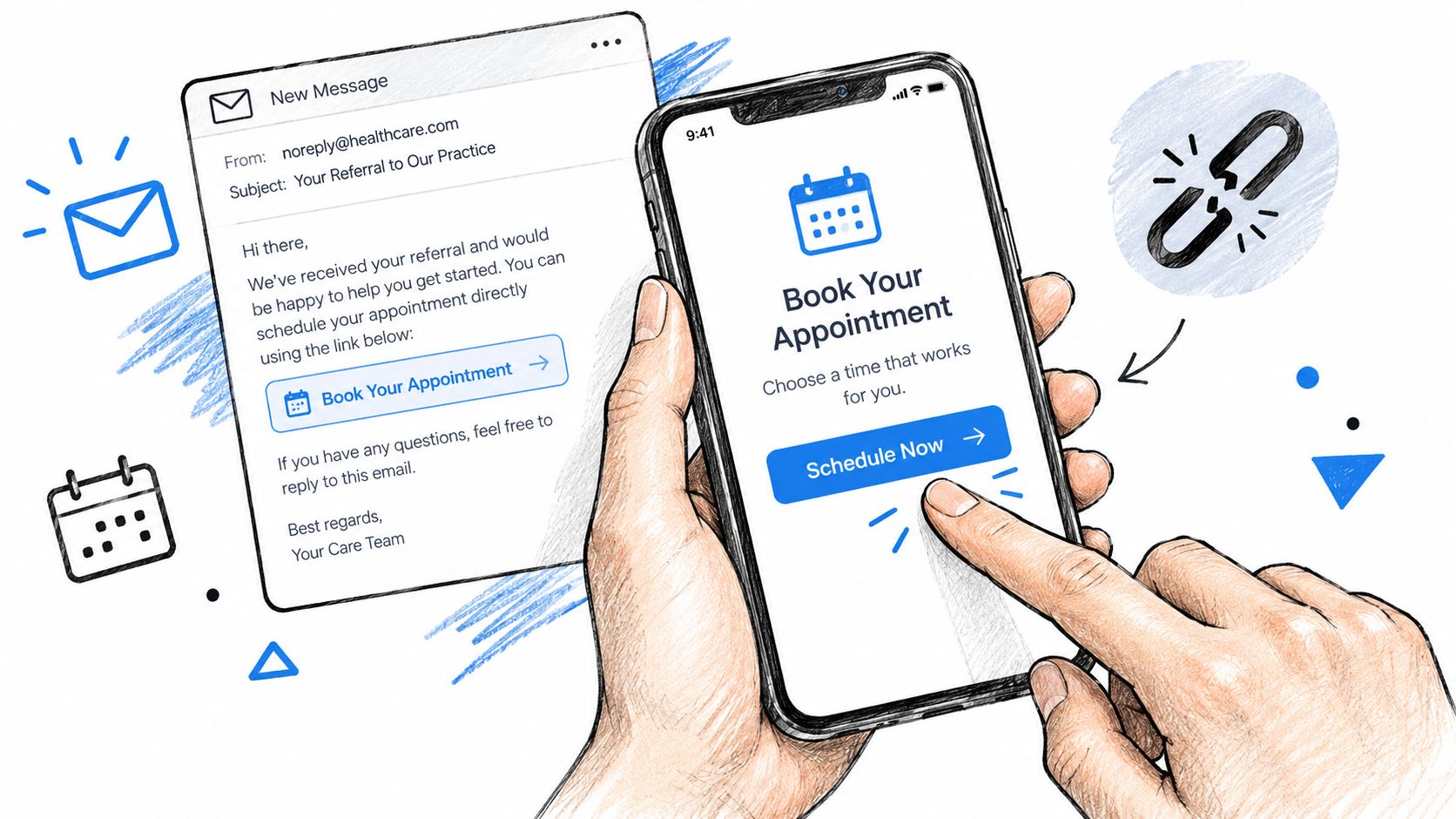
Classic mobile link methods created a structural gap. Universal Links on iOS and App Links on Android work when the app is already installed, but they can't preserve the destination through an install. Deferred deep linking was created to carry the intended screen through installation and open it on the first launch. That makes one link capable of routing users across iOS, Android, and desktop web, which is especially useful when patients discover an app through an email, referral, paid campaign, or provider invitation.
Healthcare teams should treat this as a workflow reliability concern, not merely a marketing feature. A patient may be anxious, time-constrained, unfamiliar with the product, or using an older device. Every unnecessary detour increases the chance that they stop. Teams building Healthcare AI Services should assess deep-link behavior alongside authentication, consent, accessibility, and clinical escalation paths.
The adoption story
Deep linking has moved from a differentiating capability to expected mobile infrastructure. A neutral academic analysis of the App2016 dataset found that 23,830 apps used some form of deep link, including 20.3K using scheme URLs and 8.9K using App Links. The same analysis found that 33% of the 5,223 most popular apps used scheme URLs, compared with 8% of apps with fewer than 1,000 downloads, showing that support was concentrated among higher-reach apps. These figures come from the academic deep-linking analysis.
An earlier market baseline found that only 22% of the top 200 apps used deep links, with Entertainment, News, Lifestyle, and Music leading adoption. Later reporting cited by neutral publishers described apps with proper deep linking achieving 3 to 5 times higher conversion from external clicks, with examples involving 2 times signup completion and 4 times better conversion for Branch-linked campaigns. Those figures are reported in the deep linking overview from Appy Pie, and they should be treated as directional industry evidence rather than a promise for every healthcare product.
For engineering teams, the practical conclusion is simpler. If a referral link points to a specific patient action, test whether the user reaches that action after every installation path. The relevant benchmark isn't a generic click-through rate. It's whether the patient arrives at the right screen with the right context and without exposing sensitive information in the URL.
For implementation details in React Native authentication flows, auth deep linking with React Navigation is a useful companion resource, particularly when login and post-install routing need to work together.
Setting Up the Branch SDK in Your Healthcare App
A patient taps a scheduling link from a reminder, installs the app, and still lands on the home screen. The SDK may be initialized correctly, yet the workflow fails because the app lost the original destination or tried to route before authentication. Define the route map before creating campaigns.
A scheduling link might resolve to a public appointment-intent route, while the authenticated app converts that intent into a clinic selection or booking screen after sign-in. Treat installation, authentication, consent, and patient identity as separate states in that route.
- Initialize the SDK on iOS and Android. Add the Branch SDK to both mobile targets, configure the application credentials, and start the session early enough for the first-launch callback to reach the router.
- Configure platform association. Set up the iOS universal-link domain and Android App Links for the domains used by Branch links. Test those associations on real devices, including fresh installs.
- Create an application router. Convert values such as a deep-link path or canonical URL into an approved internal destination. An arbitrary URL parameter must never become a native navigation command.
- Create and test a link. Use the Branch dashboard for a controlled link, then generate links programmatically when a clinical campaign, provider invitation, or transactional message needs its own destination.
SDK method names vary by platform and release, so pin the implementation to the current Branch deep-linking documentation. The stable sequence is to initialize, receive link data, validate it, authenticate when required, and route only after the app has enough context. Deferred deep linking deserves separate tests because the original click and the first app session occur at different times.
Keep link data useful and safe
A healthcare link should carry routing intent, not protected health information. A safe payload can identify a generic workflow, a non-sensitive appointment token, or a canonical web-equivalent URL. Do not include a diagnosis, medication name, patient name, or identifier that reveals clinical context when a message is forwarded or a platform logs the URL.
Use $canonical_url for the web-equivalent content identifier. A public scheduling resource might map to https://clinic.example.com/appointments/123, while the mobile app maps that resource to a native scheduling experience. Keep patient-specific authorization on the backend. The link starts a workflow, but the server decides whether the authenticated patient may access the record.
An illustrative routing pattern looks like this:
branch.initSession((data) => {
  const destination = validateBranchPayload(data);

  if (!destination) {
    openSafeDefault();
    return;
  }

  queueDestinationUntilAuthenticated(destination);
});
These function names describe control flow, not a copy-and-paste implementation. Use the callback model supported by the installed SDK version, then test malformed, expired, missing, and unauthorised payloads. Also test a valid link clicked before installation, during sign-in, and after a user changes accounts.
A broader guide to mobile app development for healthcare helps when deep linking is part of a larger patient-facing product. For operations teams, internal tooling can provide controlled creation, expiration, and review of links without exposing clinical data.
How the Fallback Chain Routes Users Correctly
A Branch link should behave like a controlled decision tree. The click itself is only the beginning. The system needs to determine whether the app is available, which platform is involved, where the user should go if the app is missing, and how to restore the original intent after installation.
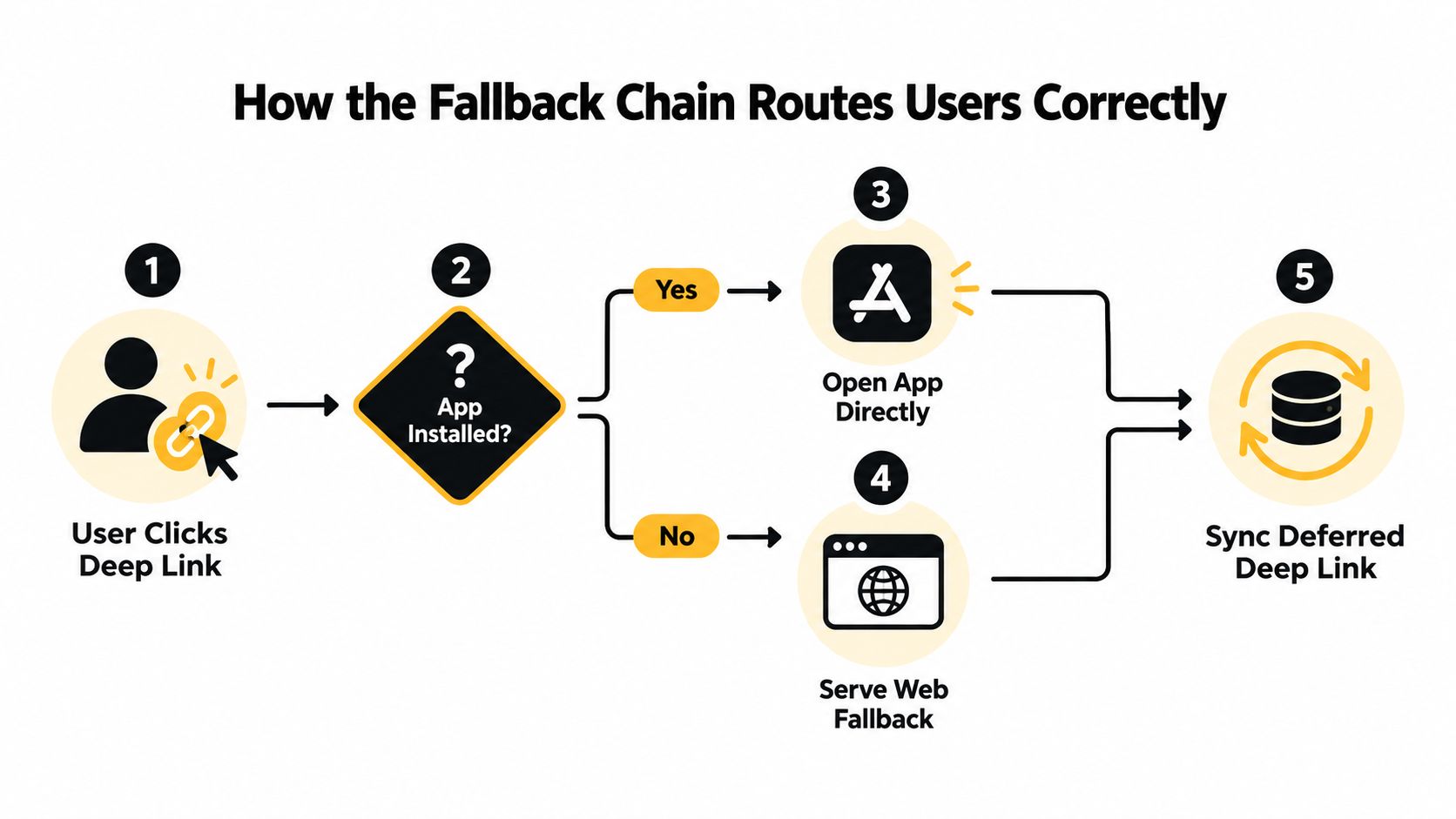
The normal sequence is:
- The user clicks the link. The link carries routing and campaign context.
- The system checks app availability. If the app is installed, the platform opens it and the app routes to the intended content.
- The system serves a fallback. If the app isn't installed, the user is sent to the App Store, Google Play, or an appropriate web experience.
- The first app launch restores context. Deferred deep linking passes the original destination into the app after installation.
- The app validates the destination. Authentication, consent, patient identity, and current workflow state determine what the user can see.
The web equivalent matters here. Branch recommends $canonical_url as the identifier for the corresponding web content. In a healthcare product, that gives the team a stable conceptual mapping between a public web route and a native screen. It doesn't remove the need for authorization. It helps the app understand what experience the link represents.
Why deterministic routing matters
Privacy changes after iOS 14 and App Tracking Transparency weakened probabilistic matching. That makes deterministic routing more important for sensitive patient journeys, while fingerprint-based matching remains a best-effort fallback rather than something an engineering team should treat as guaranteed. The healthcare implication is direct: don't design a critical appointment or onboarding path around an assumption that an inferred device match will always succeed.
Use explicit, non-sensitive identifiers and make the destination recoverable when matching fails. A patient who reaches the web fallback should see a clear next step. A patient who installs the app should receive the intended route after authentication. A patient whose link has expired should receive a safe explanation and a supported recovery path, not a blank screen or an unhandled navigation error.
Routing failures often hide in combinations that aren't covered by a happy-path test. Test installed and uninstalled states, first launch and later launch, iOS and Android, email clients and browsers, authenticated and unauthenticated users, and links opened after the app has been updated. Also test when the patient changes devices between receiving the message and opening it. A solid flow fails safely without disclosing the purpose of a private link.
Choosing the Right URI Scheme Behavior
Branch documents three URI-scheme behaviors: Conservative, Intelligent, and Aggressive. The choice affects what happens when a device attempts to open a native app route and whether the user receives a usable fallback when the app isn't installed.
Conservative mode
Conservative behavior prioritizes avoiding forced URI-scheme attempts. That can reduce confusing errors for users without the app, but it may be less assertive about opening the native experience in edge cases. It can make sense when a healthcare team values predictable web behavior over aggressive app launching, particularly for broad public links.
Intelligent mode
Intelligent is the recommended default in Branch's configuration guidance. It balances app opening with fallback behavior, which is usually the right trade-off for patient-facing workflows. A user with the app should reach the relevant screen. A user without it should receive a store or web route instead of an error that assumes the app exists.
In practice, intelligent behavior should still be tested inside the browsers and messaging applications your patients use. A platform may interpret links differently depending on the browser, operating system version, or installed app state. The setting reduces avoidable failures, but it doesn't replace device testing.
Aggressive mode
Aggressive behavior can force URI schemes broadly. Branch warns that this can produce error messages for users who don't have the app installed. That failure is especially damaging in healthcare. Someone trying to book an appointment shouldn't have to understand why a technical scheme failed before they can find a web or store fallback.
Legacy applications sometimes rely on custom URI schemes, and teams may have a valid reason to retain them. The safer approach is to keep the scheme behind a controlled decision path, pair it with a verified web route, and monitor what happens for users who lack the app. Don't assume that a scheme alone represents a complete deep-link strategy.
Practical rule: Choose the least forceful behavior that still opens the installed app reliably, then verify every fallback with real devices and real entry points.
A routing policy should also distinguish between public content and authenticated clinical content. Public education can fall back to the web. A patient-specific route should fall back to a secure recovery flow that asks the user to sign in, rather than rendering sensitive context in a browser page.
Advanced Configuration and Routing Controls
Once the basic path works, small configuration decisions determine whether links remain dependable in production. Branch exposes separate controls for the default destination, platform-specific overrides, and the time allowed for matching. Treat these values as part of your routing contract, not as campaign decoration.
The parameters that shape behavior
| Parameter |
Purpose |
Recommended Setting |
$deeplink_path |
Sets the default in-app destination |
Use an allowlisted route that represents the intended workflow |
$ios_deeplink_path |
Overrides the default destination on iOS |
Set only when iOS needs a distinct, tested route |
$canonical_url |
Identifies the web-equivalent content |
Use a stable, non-sensitive web route |
$match_duration |
Controls the snapshotting match timeout and attribution window |
Align it with the expected delay between click and install |
$deeplink_no_attribution |
Disables attribution and removes link metrics |
Use only when the privacy decision justifies the measurement loss |
$deeplink_path is useful for a standard destination, while $ios_deeplink_path lets the team account for a platform-specific route. Keep both values within a controlled route registry. A typo should produce a safe default, not an arbitrary screen or a crash.
$match_duration needs a policy. If patients commonly install immediately after clicking, a shorter operational window may fit the journey. If an invitation is opened first and the app is installed later, the team may need a different setting. The right value depends on expected install latency and the way the message reaches users. Branch's deep-link reference documents these control points and warns that malformed or appended parameters can be dropped.
Validate before sending
Build payload validation into link generation rather than discovering broken links after a campaign is live. Check that required fields exist, route names belong to an allowlist, canonical URLs use approved domains, and values don't contain PHI. Validate both the generated link and the decoded payload received by the app.
$deeplink_no_attribution=true disables attribution. That may be appropriate for a carefully designed privacy posture, but it also means losing link metrics. Don't use it as a substitute for a broader data-governance decision. Define what the team needs to measure, what it must not collect, and whether aggregated campaign performance can be retained without identifying a patient.
For production operations, log routing outcomes without logging clinical content. Record technical events such as route accepted, route rejected, fallback served, or authentication required. Restrict access to those logs and set retention according to your security and compliance requirements.
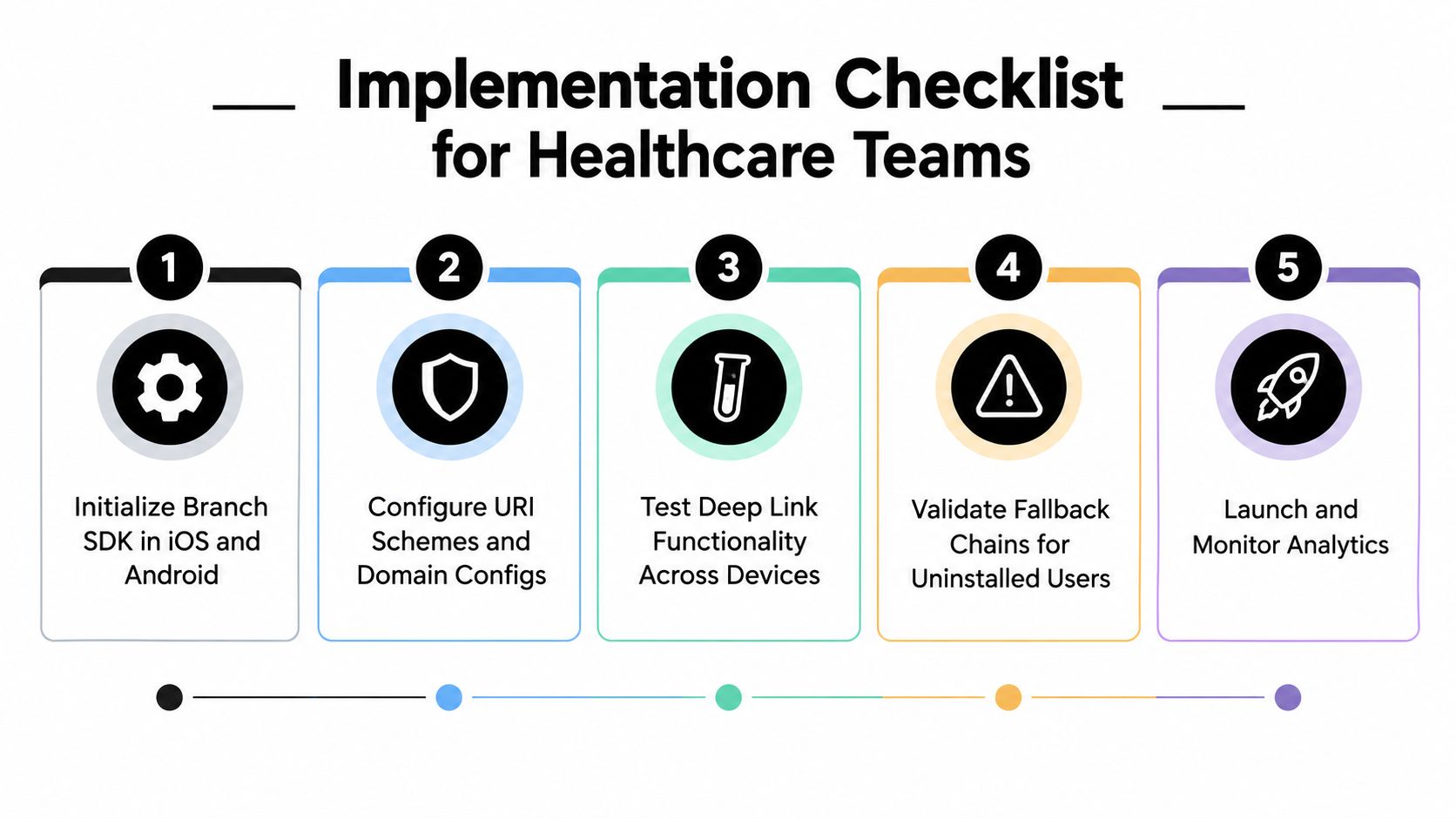
Implementation Checklist for Healthcare Teams
A deep link can fail after the click, installation, or login. Before launch, test the complete handoff between the message, Branch, the app, and the authenticated clinical workflow.
- Initialize both platforms: Confirm the Branch SDK starts on iOS and Android, including first-launch and deferred-link handling.
- Define safe destinations: Allowlist routes, reject unknown paths, and keep PHI out of parameters, logs, and analytics.
- Configure the fallback chain: Test installed, uninstalled, web, store, authenticated, and unauthenticated states on physical devices.
- Select URI behavior: Use Intelligent behavior by default. Document any exception and its effect on routing.
- Validate parameters: Check
$deeplink_path, $ios_deeplink_path, $canonical_url, and match settings before distribution.
- Test real entry points: Open links from email, browsers, messages, and provider workflows, including links received after installation.
- Monitor routing outcomes: Record accepted, rejected, fallback, authentication, and failed handoffs without collecting unnecessary patient information.
Use a healthcare deep-link implementation workflow to assign ownership across mobile, backend, privacy, clinical operations, and release teams. Broader planning resources include an AI adoption guide, real-world use cases, our expert team, a healthtech engineering partner, SaMD solutions, AI Automation as a Service, custom healthcare software development, a regulatory compliance partner, AI tools for business, and Healthcare AI Services.
Ekipa AI helps digital health teams design, build, and scale secure healthcare products, including routing, integrations, AI workflows, and compliance controls. Visit Ekipa AI to review your deep-linking architecture and implementation plan.