
Healthcare App
Branch Deep Links Guide for Healthcare Apps
Master branch deep links for healthcare apps. Learn SDK setup, routing, deferred deep linking, and mobile/desktop behavior
October 04, 2026Read more
A practical engineering guide to HIPAA compliance on AWS. Covers BAA, shared responsibility, encryption, audit logging, and AI workload governance.

A healthtech team can deploy on an AWS HIPAA-eligible service, encrypt its database, and still fail a serious review. The usual gaps aren't in the underlying AWS facility. They're in IAM policies, application behavior, account designation, data-flow documentation, and logs that can't prove who accessed what.
HIPAA compliance on AWS is therefore an engineering discipline, not a label inherited from a cloud service. AWS provides eligible infrastructure and contractual mechanisms, but your team must configure, operate, document, and continuously verify the controls around every ePHI flow.
A team ships a patient-intake workload on an AWS service listed as HIPAA eligible. Months later, an OCR-style review asks for the IAM access model, application audit events, encryption configuration, and evidence that PHI stayed inside approved services. The team can show an AWS service name, but not how its own software enforced least privilege or recorded access.
That outcome is predictable under the AWS Shared Responsibility Model. AWS manages security of the cloud, including physical facilities, hardware, the hypervisor, and the infrastructure supporting its services. The customer manages security in the cloud, including data, identity and access management, operating-system patching where applicable, network controls, application logic, encryption choices, and audit configuration. AWS explains this boundary in its HIPAA compliance FAQ, which also makes clear that there is no HIPAA certification for a cloud service provider.
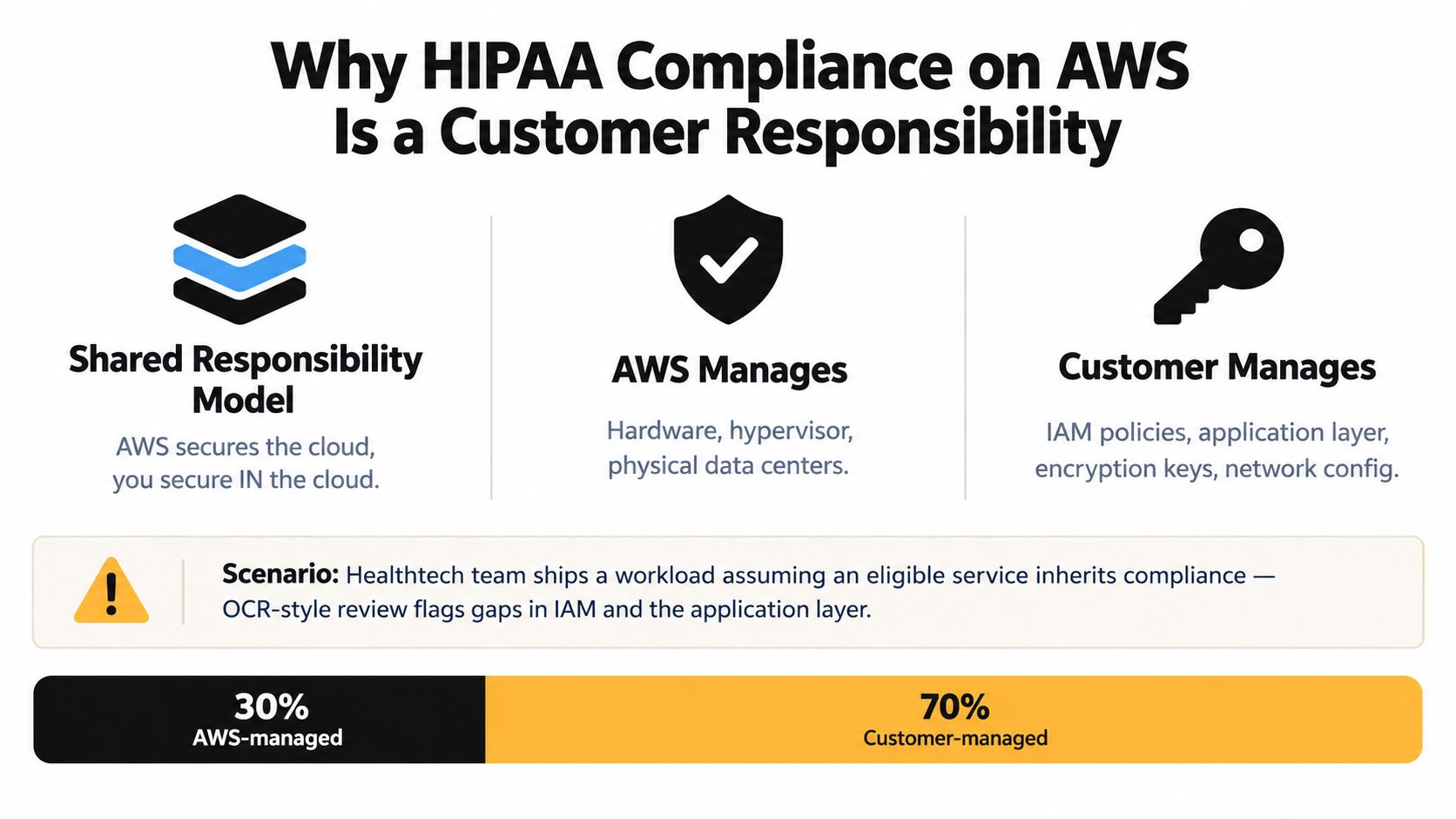
The AWS Business Associate Addendum, or BAA, establishes the contractual relationship needed when AWS handles ePHI on behalf of a covered entity or business associate. It doesn't approve your architecture, inspect your IAM policies, or make an unconfigured application compliant.
AWS introduced a self-service BAA workflow in AWS Artifact on June 13, 2017, allowing customers to review, accept, and track the BAA online and designate an AWS account as a HIPAA Account through the compliance portal. That shift made onboarding more scalable, but it didn't transfer implementation responsibility to AWS. Customers still need to configure the controls that protect PHI.
Practical rule: Treat “HIPAA eligible” as an architectural input, not an implementation result.
AWS states that customers may use any AWS service in a HIPAA-designated account, but PHI may be processed, stored, or transmitted only through HIPAA-eligible services. A non-eligible service doesn't become acceptable because the surrounding workload uses encryption or private networking.
The engineering response is straightforward:
The rest of the architecture follows from that discipline. AWS supplies the foundation. Your team must prove that the deployed system uses it correctly.
The first implementation task is account and data-flow scoping, not procurement. Before a patient record reaches AWS, sign the BAA through AWS Artifact and designate every account that will process, store, or transmit PHI. AWS says customers must identify each account containing PHI as a HIPAA account under the BAA, so a workload account shouldn't be treated as covered merely because it belongs to the same AWS Organization.
Create an inventory that includes production, disaster recovery, analytics, machine learning, integration, and support accounts. For each account, record whether it can receive ePHI, whether it has network paths to an ePHI system, and who approves changes to its scope.
Then accept the BAA in Artifact and apply the designation to the accounts that handle PHI. Keep the acceptance record and account list with the compliance evidence. If a new account is created later, add it to the governance process before a deployment sends data there.
Use a one-page diagram that starts with the patient device and ends with retention, deletion, or downstream disclosure. Include API gateways, load balancers, queues, Lambda functions, databases, object storage, observability tools, data warehouses, model endpoints, vendor integrations, and administrator access paths.
For each hop, mark:
AWS's HIPAA-eligible services reference states that AWS has demonstrated compliance only for listed services and that customers must configure those services consistently with HIPAA requirements. It also notes that eligibility can include service-level exceptions, so teams must review the details rather than assume every feature or path is covered.
A non-eligible hop becomes a remediation item. Replace it, remove PHI from the flow, or redesign the boundary so that the service cannot process, store, or transmit ePHI. The completed diagram is more than architecture documentation. It becomes a primary audit artifact that connects the BAA, service inventory, control design, and test evidence.
Encryption is necessary, but it won't compensate for a weak identity boundary or an open storage policy. AWS operates the underlying KMS infrastructure, HSMs, hypervisor, and physical network. Your team owns key policy design, IAM permissions, bucket policies, security groups, subnet rules, and the configuration of each service.
AWS states that PHI processed, stored, or transmitted through HIPAA-eligible services requires encryption at rest and in transit, and that customers must designate accounts containing PHI as HIPAA accounts. Apply those requirements as enforceable controls rather than policy statements.
At rest, use customer-managed KMS keys where the workload requires direct control over key administration and usage. Separate key administrators from key users, restrict decrypt permissions to workload roles, avoid wildcard principals, and apply encryption defaults to S3, RDS, EBS, and other eligible storage services. Automatic rotation can reduce operational risk, but it doesn't fix an overbroad key policy.
In transit, enforce TLS across client, service, and internal application connections. Disable plaintext HTTP on load balancers handling PHI, use ACM-issued certificates, and automate certificate renewal. Private connectivity through VPC endpoints can keep service traffic off the public internet, but the application still needs authenticated and encrypted connections.
At the boundary, use AWS Organizations service control policies to restrict non-approved regions and services for workload organizational units. Place ePHI systems in private subnets, use security groups with narrowly defined paths, require role-based access, and make session context visible through session tags where that supports investigation.
| Control Area | AWS Responsibility | Customer Responsibility | Common Audit Finding |
|---|---|---|---|
| Key infrastructure | Operates KMS infrastructure and underlying HSM protections | Defines key policies, administrators, grants, rotation, and decrypt permissions | KMS key policy allows wildcard principals |
| Storage encryption | Provides encryption capabilities in eligible storage services | Enables encryption and verifies it remains enabled across resources | S3, RDS, or EBS resource created without the required encryption |
| Network transport | Operates AWS network infrastructure | Enforces TLS, private routing, VPC endpoints, and security-group rules | HTTP endpoint or unnecessary public path handles PHI |
| Identity | Provides IAM and account security mechanisms | Designs least-privilege roles, MFA, boundaries, and access reviews | AWS-managed policy grants broader access than the application needs |
| Network evidence | Provides logging features and network services | Enables VPC Flow Logs and retains them with other audit evidence | Missing Flow Logs on PHI-bearing subnets |
| Account governance | Provides Organizations and policy controls | Applies SCPs, separates environments, and reviews exceptions | Workload account can use unapproved services or regions |
The findings that recur most often are ordinary configuration errors: permissive S3 bucket policies, KMS keys with broad principals, and absent VPC Flow Logs. Automated preventive controls help, but a reviewer will still expect evidence that someone tested the boundary and investigated exceptions.
A log that exists somewhere in a production account isn't an audit trail. It becomes useful evidence when the organization can show complete coverage, controlled access, retention, integrity, ownership, and a repeatable way to retrieve it.
Start with a dedicated log archive and security account. Configure organization-wide CloudTrail with multi-region coverage, log-file validation, and KMS encryption. Route AWS Config history, conformance-pack results, Security Hub findings, VPC Flow Logs, and ALB access logs into controlled destinations. GuardDuty and Detective findings should feed the same investigation and evidence process rather than sit in separate consoles.
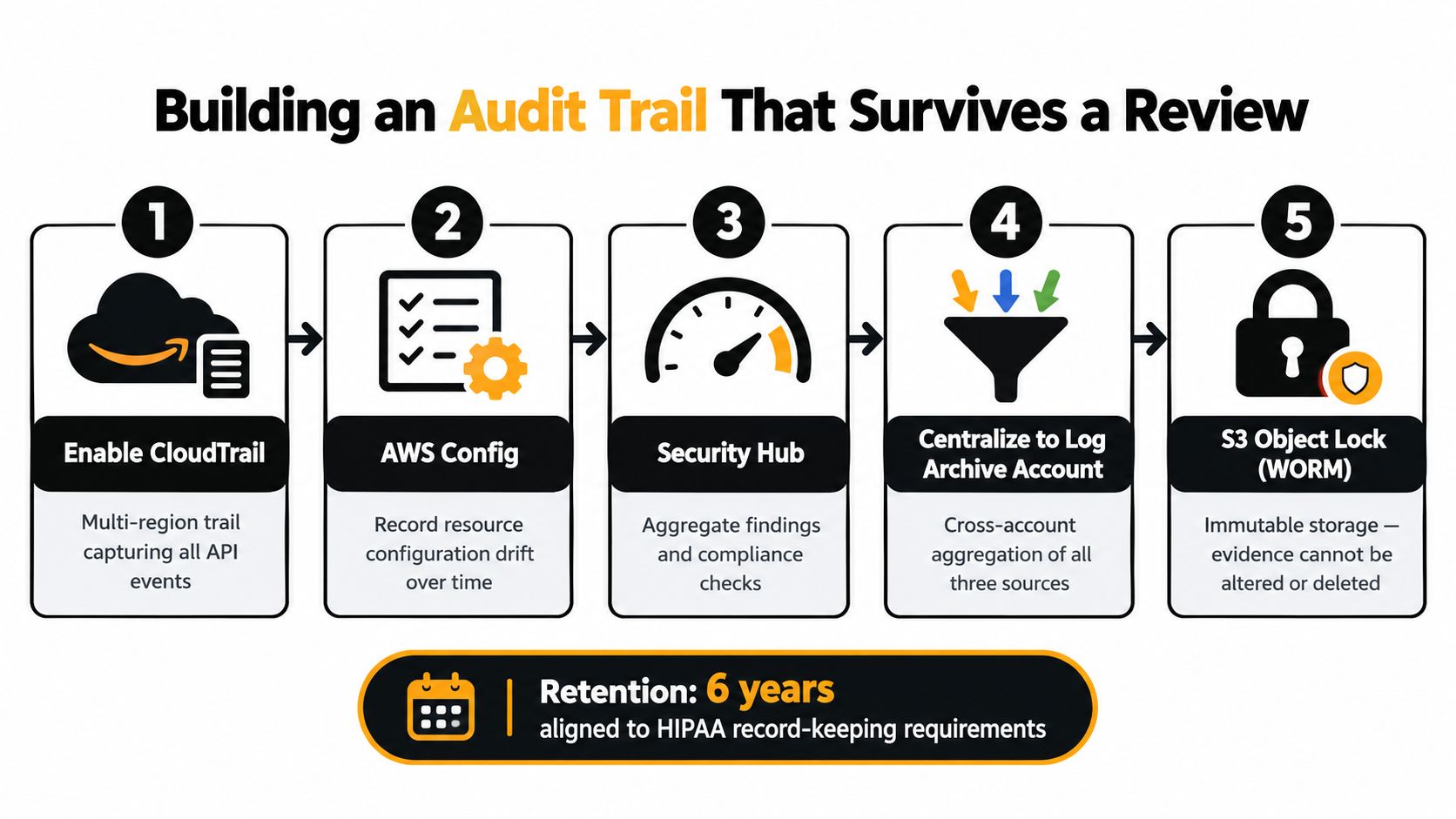
Use S3 Object Lock in the archive account so retained evidence can't be altered or deleted through ordinary administrative actions. Restrict access to the archive, separate the roles that operate workloads from the roles that review evidence, and monitor changes to the archive configuration itself.
AWS's HIPAA-ready architecture guidance says technical safeguards include audit controls that record activity in systems containing PHI, and that supporting documentation should be retained for at least 6 years. The audit trail compliance tutorial provides useful general guidance on organizing audit records, but AWS-specific configuration and retention decisions still belong in your control design.
Tag each trail, log bucket, and Config recorder with its owning workload. A reviewer should be able to identify the account, region, service, and business owner without asking an engineer to interpret an anonymous bucket.
A defensible evidence package contains:
Export the package in a format an auditor can verify offline. The test is simple: can an independent reviewer establish what happened without granting production access or relying on an engineer's memory?
A model invocation isn't automatically safe because the underlying AI service is hosted by AWS. AI adds new data paths, including prompts, retrieved documents, embeddings, conversation memory, tool calls, model responses, evaluation datasets, and operational traces.
AWS says Amazon Nova Act became HIPAA eligible in May 2026, and AWS published HIPAA-ready generative AI architecture guidance in June 2026. AWS also says its compliance program spans 143 standards and certifications, but those broad program statements don't answer the architectural question that matters: which exact model, feature, account, and data path will touch PHI? The AWS announcement about Amazon Nova Act is a useful eligibility signal, not a substitute for reviewing the current service reference and your BAA.
| Control Area | Traditional Workload | AI/Agentic Workload |
|---|---|---|
| Data boundary | Database, API, queue, and storage paths | Adds prompts, retrieval, embeddings, memory, tool inputs, and outputs |
| Access control | User and service roles | Must propagate tenant and patient authorization into retrieval and tools |
| Audit events | API calls and record access | Includes prompts, retrieved sources, model version, tool calls, and response handling |
| Leakage risk | Misconfigured storage or endpoint | Prompt injection, unauthorized retrieval, re-identification, and output disclosure |
| Validation | Schema, authorization, and transaction tests | Guardrail tests, adversarial prompts, response review, and human approval |
Keep training data PHI-free where the use case allows it. If retrieval uses clinical records, isolate the vector store, enforce tenant-aware authorization before retrieval, and prevent the model from treating retrieved text as trusted instructions. Log model inputs, retrieval decisions, tool calls, and output disposition without placing unnecessary PHI into operational logs.
Prompt-injection tests need to cover malicious documents, user instructions, tool permissions, and indirect instructions in retrieved content. For clinical summarization, add a human-in-the-loop checkpoint before output reaches a patient, clinician, or downstream record. Teams building regulated clinical software can also review SaMD solutions when the AI workflow forms part of a software-as-a-medical-device product.
A practical pattern is PHI-free training, authorization-scoped retrieval, isolated inference, explicit tool permissions, and human approval at the release boundary. That pattern is more useful than asking whether “AI is HIPAA compliant” in the abstract.
Consider a representative telehealth SaaS platform. Patients start intake through Amazon CloudFront and AWS WAF. Requests reach an application load balancer in a private subnet, where the application runs on ECS Fargate and writes clinical workflow data to encrypted RDS for PostgreSQL. Asynchronous work moves through SQS and Lambda, while approved PHI files reside in Amazon S3 with SSE-KMS.
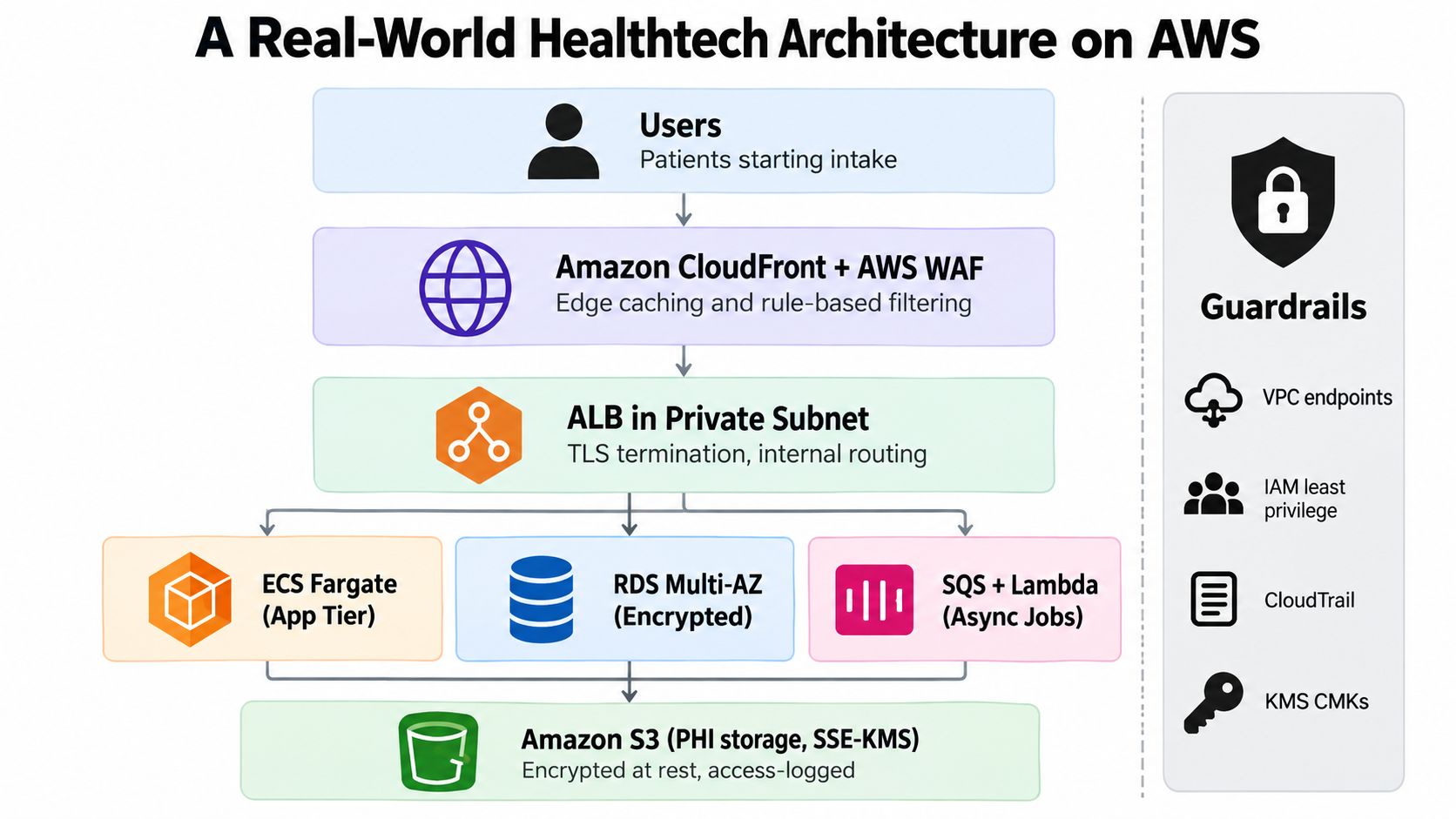
The design separates traffic handling, application execution, persistence, and security evidence. Patient-facing endpoints use TLS, application tasks receive workload-specific IAM roles, and database access doesn't depend on long-lived credentials. VPC endpoints provide private access to required AWS services, while security groups permit only documented flows between tiers.
Transcripts move to a dedicated account for a Bedrock-backed summarization job. That account has no ordinary internet egress, uses a narrowly scoped role, and exposes only the data and tools required for the summarization task. The job's inputs, retrieval activity, model invocation, response handling, and approval state are included in the evidence design.
CloudTrail and AWS Config send records to the centralized archive account. Security Hub aggregates findings and compliance checks, while the application writes access events that CloudTrail alone cannot provide, such as which patient record a permitted user viewed inside the application.
An audit request should produce a coherent package:
The architecture doesn't become defensible because it contains more AWS services. It becomes defensible when each service has a defined purpose, a known data classification, a responsible owner, and evidence that the configured control works. Teams looking for Healthcare AI Services should apply the same standard to the product layer, not only to the cloud foundation.
Use this checklist as a release gate. Each item should have an owner, a test result, and evidence stored where an auditor can retrieve it.
PHI can reach an S3 bucket outside the designated account when an integration uses a default destination. CloudTrail may cover the primary region while another enabled region remains unmonitored. AWS-managed IAM policies can grant permissions beyond the application's actual needs. An AI team may invoke a model or feature without checking its current eligibility. Break-glass access may exist operationally but lack approval records, monitoring, and post-use review.
These failures create a gap between policy and deployment. Close it with preventive policies, continuous detection, and evidence that remediation was completed. A failed control should produce a ticket, an owner, a resolution record, and proof that the fix was tested.
What will an auditor usually request first?
Expect the BAA record, account inventory, ePHI data-flow diagram, service eligibility decisions, IAM reviews, encryption and KMS policies, logging configuration, incident procedures, and samples showing that controls work in practice. Keep the evidence tied to the deployed account and application version, rather than presenting only policy templates.
How long should supporting audit documentation be retained?
AWS HIPAA-ready architecture guidance says supporting documentation for technical safeguards should be retained for at least 6 years, as described in the AWS HIPAA compliance guidance. Confirm the obligation with legal and compliance teams, since contracts and applicable requirements may add conditions.
Does the BAA replace an internal risk assessment?
No. The BAA establishes the AWS business associate relationship. It does not identify application threats, validate access decisions, assess vendors, or document how the organization manages risk.
What changes when Bedrock or another AI service is involved?
The review must cover model and feature eligibility, prompt and retrieval data, memory, tool permissions, logging, output disclosure, re-identification risk, adversarial testing, and human approval. The Ekipa AI FAQ can provide a starting point for healthcare AI questions, but decisions still need validation against the organization's legal and security requirements.
External support can help when ownership is clear. A regulatory compliance partner may coordinate compliance work, while custom healthcare software development can place controls inside the product. Teams evaluating AI requirements analysis should require explicit data boundaries and evidence responsibilities. Related delivery references include AI tools for business, an AI Product Development Workflow, AI Automation as a Service, internal tooling, a Custom AI Strategy report, and documented real-world use cases.
A prospective healthtech engineering partner should explain how it produces configuration evidence, approval records, and test results, not only application features. Ekipa AI helps healthtech teams design and build AWS workloads with privacy controls, audit trails, AI governance, and compliance requirements reflected in the software architecture. See Ekipa AI or our expert team for implementation support.
Master branch deep links for healthcare apps. Learn SDK setup, routing, deferred deep linking, and mobile/desktop behavior

Plan healthcare software modernization with a practical roadmap covering assessment, re-architecture, migration, and compliance for legacy systems.

Clarify the distinction between ai agent vs agentic ai and learn practical implications for healthcare design, governance, and real-world deployment.
Connect with our team to explore how AI expertise can transform your business.