In ASTP/ONC's 2023 national survey of health information exchange organizations, 90% routinely received HL7 v2 ADT messages from their participants, the notifications that tell care teams a patient was admitted, discharged or transferred, according to ASTP/ONC Data Brief 75. Your product still has to consume those events, while the same hospital expects new applications to read and write through FHIR APIs.
What an HL7 integration project covers
A hospital connection is usually several interfaces working together, each with its own trigger, direction, sender, receiver, acknowledgment rule, and owner. Think of the inventory as a wiring diagram for clinical data. It shows which events the hospital will send, which data your application may write back, and where the boundary sits before any mapping work begins.
HL7 v2 event messages such as ADT, ORM, ORU and SIU commonly move between hospital systems over MLLP, while HL7 FHIR exposes data as resources through API interactions. A practical scope decision is made element by element. Patient demographics may arrive in an HL7 v2 PID segment, orders may arrive as ORM, and newer patient-facing or app-facing reads may be better handled through FHIR APIs where the EHR offers them. Teams that need both usually scope them together as HL7 and FHIR integration services.
| Interface |
HL7 v2 message types |
Direction |
Validate first |
| ADT (patient administration) |
A01 admit, A03 discharge, A08 update patient information |
EHR to downstream systems |
PID patient identifiers, PV1 patient class and location |
| Orders |
ORM^O01 order message |
Ordering system to lab or radiology |
Placer and filler order numbers, order control codes |
| Results |
ORU^R01 unsolicited observation result |
Lab or radiology to EHR |
OBR result status, OBX value types and abnormal flags |
| Scheduling |
SIU^S12 appointment notification |
Scheduling system to EHR and downstream apps |
Appointment ID, resource, start and end times |
Who owns which decision
The hospital owns the interface specification and the EHR configuration behind it. The EHR vendor owns the sending build and the change windows when that build can move. Your team owns the listener, the mapping, the error handling, and the evidence that both work.
That ownership split matters because the same field can have different meanings in different systems. A local code set, a patient identifier domain, or an order status may look valid in a sample message and still be wrong in production.
Cost and schedule follow four things: how many interfaces are in scope, how far each sender departs from the standard profile, how many parties must sign off, and how many local code sets need agreement. The deliverable before development starts is an interface inventory the hospital has reviewed and accepted in writing. Our guide to EHR integration cost breaks those drivers down further.
How messages move from the EHR to your application
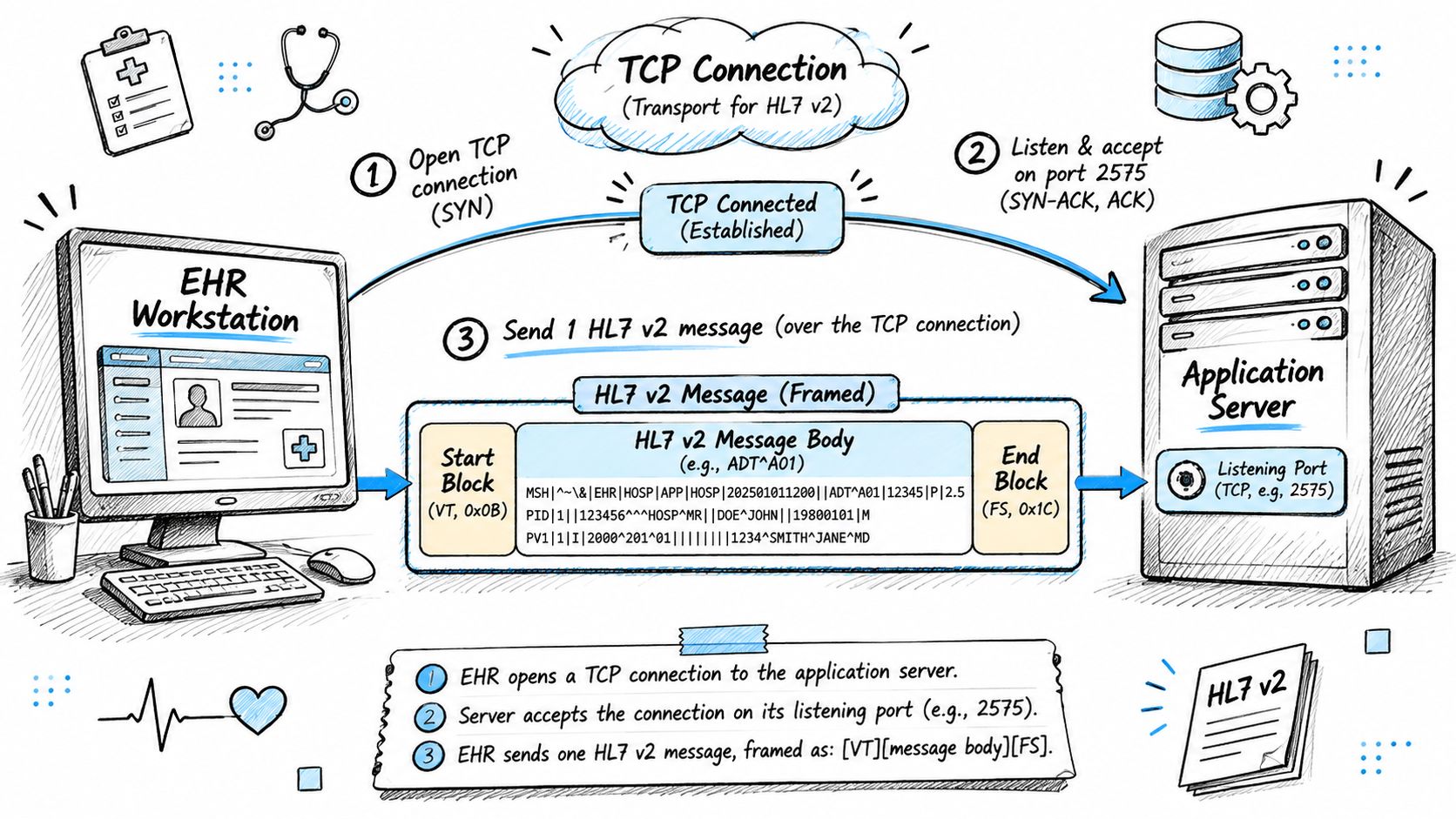
A message moves like a parcel through a sorting depot. The sending system opens a TCP connection to a listening port agreed with the receiver. MLLP wraps the HL7 v2 message in a start-of-block byte 0x0B, followed by the message body, then end-of-block 0x1C and carriage return 0x0D. That wrapper matters because the receiver needs a clear boundary for each message. Without it, two messages can blur into one stream and fail to parse.
The receiver returns an ACK. Its MSA segment reports AA for accepted, AE for an application error or AR for rejected. The sender has to act on that response rather than assume delivery. Connectivity usually means a site-to-site VPN or dedicated private circuit between the hospital network and your hosting environment, with allow-listed IP addresses, agreed ports, and TLS where hospital policy requires it.
The interface engine works like the depot manager. It routes messages to destinations, transforms them between formats or versions, and queues them when a downstream system is unavailable. That queue gives your endpoint time to recover instead of forcing the sender to replay everything by hand. If you're choosing one, our comparison of Mirth Connect alternatives covers the main interface engine options.
A sender that ignores the ACK will report a clean interface while your application is missing admissions.
Say the EHR sends an ADT A01 to the engine. The engine forwards a copy to your endpoint, then holds delivery in a queue while that endpoint is down. The flow can support a clinic AI assistant when encounter context needs to reach a downstream application. Three failure points recur. Firewall idle timeouts drop long-lived TCP connections. Mis-framed messages never parse. Senders never check the ACK.
The hospital decides whether the engine runs on premises or in a cloud environment its policy allows. Treat the transport, the frame, the ACK and the queue as four separate controls. A failure in one does not prove the others are healthy, so test each control before judging the interface as live.
Mapping and transforming HL7 v2 data
Two systems can both claim HL7 v2 conformance and still differ in optional segments, local codes, field usage and acknowledgment behavior. The HL7 v2 product brief describes v2 as the most widely implemented clinical exchange standard, with message profiles specifying each message's permissible content and structure. Ask for the sender's profile or conformance statement plus sample messages before you write a mapper, and treat that profile as the executable contract.
The segments you'll work in most are MSH for the message control ID and version, PID for patient identifiers, PV1 for patient class and location, and OBR and OBX for orders and results. Fields repeat and split into components, so a PID-3 identifier list with several entries has to resolve to one internal patient key by an agreed rule, never by guessing which identifier looks newest.
Local codes need the same discipline. An OBX-3 observation identifier from a hospital lab maps to a standard code such as LOINC only after the code set is agreed with the sender. Normalize timestamps and time zones at the boundary, and validate required fields and cardinality before anything reaches your data model.
A worked example, hypothetical
A lab result arrives as ORU^R01 with a local OBX-3 code and a numeric OBX-5 value. The mapper checks the observation result status in OBX-11, translates the code through the agreed table, stores the original MSH-10 control ID so a redelivery is idempotent, and returns AE when a required status is missing. Mapping effort scales with the number of local code sets, the variation between senders, and the message types in scope.
Testing and go-live for an HL7 interface
A successful ACK is a receipt, not proof that the clinical workflow works. Build your test sequence around the interface inventory, sender's profile, sample messages and expected ACK behavior. Keep the agreed HL7 v2 or FHIR path for each data element visible in the scenarios so testers check the intended route.
Start in a non-production environment. The integration team should check required fields, cardinality and data types against the sender's profile, then exercise failure cases: malformed frames, missing fields, duplicate control IDs, discharge before admission, unknown patients and an offline receiver. Define the expected outcome and responsible owner for each case. Every failure needs a visible result.
Clinical and registration staff should then run scripted end-to-end scenarios and inspect the receiving application's data. Where the existing path remains available, compare outputs during an agreed parallel run.
Rehearse rollback during the build: stop sending, restore the legacy feed and replay queued messages in order. Name who authorizes rollback and who executes it. Ekipa AI's implementation support work includes support for EHR/EMR integrations, HL7, FHIR and API-based interoperability.
Keep the following sign-off evidence together:
- Test scripts with results: record each scenario, expected and actual outcomes, and the tester's sign-off.
- Message logs with ACK records: show that accepted, errored and rejected messages received the specified handling.
- Defect log and written acceptance: assign owners to open items and obtain the hospital owner's acceptance of the interface.
Set the cutover schedule around EHR vendor change-freeze windows, test-environment availability, interfaces that must switch together and local code agreement. These dependencies determine when the evidence can be completed.
Use synthetic or de-identified test data. If testing requires real PHI, have qualified privacy and compliance advisors confirm that the test environment meets applicable safeguards before that data enters it.
Monitoring, errors and replay in production
Monitor each interface separately: messages received and sent, ACK rate, rejects, queue depth, end-to-end latency, and the age of the oldest queued message. That last metric catches a feed that looks healthy because messages are still flowing while one patient's result sits stuck.
Separate error classes before you write alerting:
- Transport errors: refused connections and timeouts get retried with backoff, and the retry limit is explicit.
- Application errors: an
AE or AR means a person examines and corrects the message, since retrying identical content changes nothing.
- Semantic errors: the ACK passes but the data is wrong, and only reconciliation checks and clinician reports reveal it.
Messages that fail after the retry limit go to a dead-letter queue with a named owner who triages every entry. Replay resends with the original MSH-10 control ID so receivers can detect duplicates, and in original order, because a discharge replayed ahead of its admission creates a broken record. Route alerts to the team that can act on them, including the hospital integration contact for sender-side faults.
Security evidence per feed
45 CFR 164.312 sets five technical standards: access control (a), audit controls (b), integrity (c), person or entity authentication (d) and transmission security (e). Access control limits which systems and users reach the feed, audit controls record and examine activity, integrity protects against improper alteration, authentication verifies the identity of the person or system seeking access, and transmission security protects data in transit. Encrypted transport is one control among them.
The covered entity owns the HIPAA risk analysis and control requirements. Your integration team implements the agreed controls and supplies evidence: access configuration, audit logs, runbooks, and records of detected incidents. Confirm specific obligations with qualified compliance advisors.
HL7 v2 alongside FHIR in one architecture
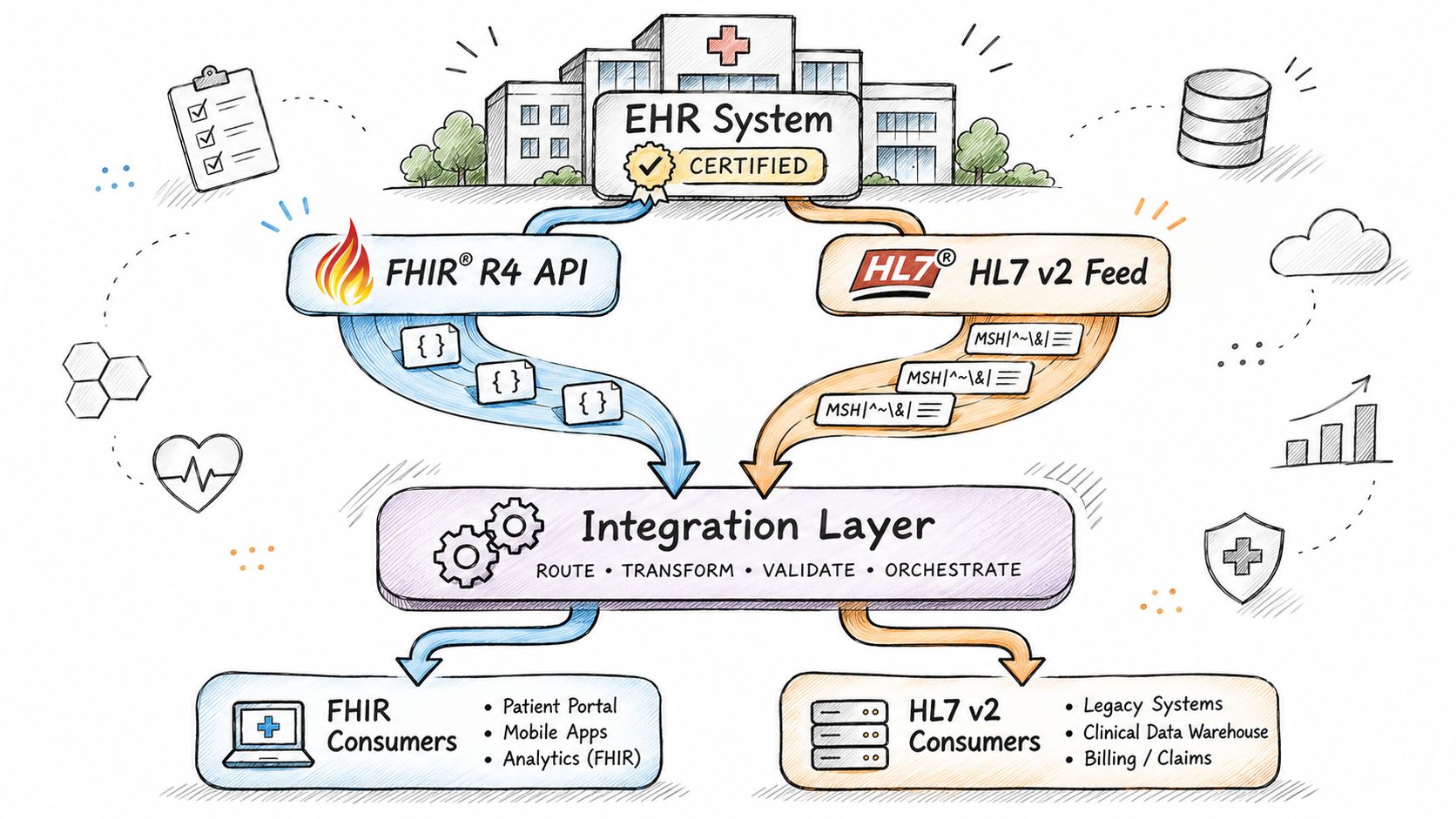
A discharge, an order and a result can reach the same product through two different doors. Under the ONC Health IT Certification Program, certified health IT developers had to give their customers FHIR-based standardized API technology (45 CFR 170.315(g)(10)) by December 31, 2022, as ASTP/ONC explains. Plan for that API access, while expecting production coverage to remain uneven across sites and participants.
Start the split at the interface inventory, not at build time. Keep v2 for hospital-published events such as ADT, orders and results, and for reference data that still arrives as messages. Choose FHIR for application reads and writes, patient-facing apps and new integrations where the API exposes the needed resource. For each data element, name one authoritative source, such as demographics from ADT or Patient and results from ORU or Observation, and keep that decision in the mapping workbook. For a fuller comparison of the two standards, see FHIR vs HL7, and for moving feeds from v2 to FHIR over time, see the HL7 v2 to FHIR migration roadmap.
Request the narrowest SMART scopes the workflow needs, such as launch/patient and patient/Observation.rs from the SMART App Launch scope documentation, and lock the FHIR release (R4, R4B or R5) and the HL7 v2-to-FHIR implementation guide version before development.
Run coexistence through go-live. When a v2 replay and a FHIR write can describe the same clinical fact, receivers need duplicate checks and sequence rules so one event cannot create two records.
HL7 and FHIR integration
Connecting your product to hospital EHR feeds?
We scope the interface inventory, build listeners and mappers, and set up monitoring, replay and audit evidence before go-live.
Prefer to pick a time? Book a call directly
Conclusion
Settle the interface inventory and its owners before design, because interface count, sign-off parties and EHR vendor change windows drive most of the cost and schedule. Get the sender's message profile and the agreed local code sets in writing before build, since those two documents decide your mapping risk. Treat monitoring, dead-letter handling, replay and audit evidence as go-live requirements rather than later additions. Decide the HL7 v2 and FHIR split per data element and record the authoritative source for each.
If you're scoping an HL7 or FHIR integration, talk to our team about the interface inventory first, or see how we approach EHR integration services.
Frequently asked questions
Is HL7 v2 being replaced by FHIR?
No, most hospital interfaces still use HL7 v2 over MLLP, and certified EHRs add FHIR R4 APIs alongside those feeds rather than instead of them. The FHIR specification defines resource-based exchange, which suits application access, while event notification stays message-based in most hospitals. Plan for both channels in the same architecture.
Do you always need an interface engine?
A single simple point-to-point interface may not need one. Once you have several senders, routing rules, format or version transformations, and queuing for downstream outages, an engine usually earns its place. The decision rests on how many destinations and failure modes you have to manage, not on message volume alone.
How long does an HL7 integration take?
There's no standard duration. The drivers are interface count, how far each sender deviates from its published profile, the number of parties who must sign off, and the EHR vendor's change windows. Agreeing local code sets often takes longer than writing the mapper.
What do teams most often underestimate when scoping?
Local code sets and sender-specific variation. Two senders using the same message type can populate optional segments and fields differently, so each one needs its own samples, its own mapping rules and its own test cases. Budget review time with the hospital's lab, radiology and registration owners, not just its integration team.